Paint Your Tile Map
Click cells on the grid to place tiles. Each cell becomes a 3D tile piece in the exported asset.
Build modular 3D tile sets in your browser. Configure procedural geometry, assign PBR textures, and export directly to Unity, Godot, or Unreal Engine as a GLB file.
No credit card · No download · Works in browser
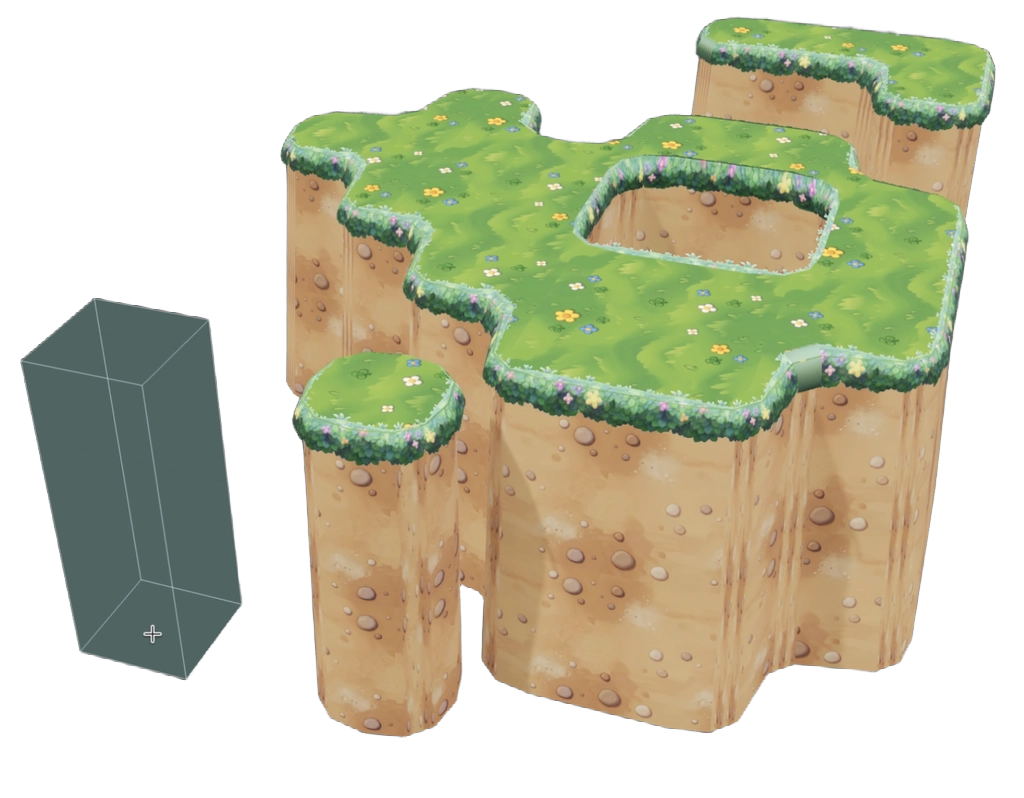
QuickTile turns a painted grid into export-ready 3D tile geometry in minutes — entirely in your browser.
Click cells on the grid to place tiles. Each cell becomes a 3D tile piece in the exported asset.
Set layer height, wall thickness, corner radius, crown shape, and smooth shading options per layer.
Upload your own textures or generate AI textures with QuickTexture. Assign to floor, wall, and crown surfaces.
Orbit around your tile set in the real-time 3D viewer. Inspect geometry and textures before export.
Download your complete tile set as a .glb file. Compatible with all major 3D tools and game engines.
Drop the GLB into Unity, Godot, or Unreal Engine. Use the included Unity package for fast setup.
QuickTile is built specifically for game developers who need modular tile sets fast, without the overhead of a full 3D modeling suite.
Full, corner, edge, and inner-corner tile shapes are generated automatically from your painted grid layout.
Stack multiple geometry layers — floor plates, raised walls, crown trim — each independently configurable.
Control corner radius per layer for smooth, stylized tile edges. Great for low-poly and stylised art styles.
Toggle smooth normal generation for a clean look, or use hard edges for a faceted, low-poly aesthetic.
Assign base color, normal, roughness, and metallic textures per surface. Industry-standard PBR workflow.
Native support for Unity's dual-grid tile system. Generates the correct tile variants for seamless level assembly.
One-click export to the open glTF/GLB format. Works in Unity, Godot, Unreal Engine, Blender, and more.
No installation, no account, no cost. Open the URL and start building — works on any modern desktop browser.
Pair QuickTile with QuickTexture AI to generate seamless PBR textures for your tiles in seconds with a text prompt.
Compare QuickTile with other common approaches to building modular tile sets for game development.
| Feature | QuickTile (Free) | Blender (Manual) | Asset Store Packs | 3ds Max / Maya |
|---|---|---|---|---|
| Free to use | ✓ | ✓ | ✗ (paid) | ✗ (paid) |
| No installation required | ✓ | ✗ | ✗ | ✗ |
| Procedural tile generation | ✓ Automatic | ✗ Manual | ✗ Pre-made | ✗ Manual |
| GLB export for game engines | ✓ | ✓ | ✓ | ✓ |
| Unity dual-grid support | ✓ | ✗ | ✗ | ✗ |
| AI texture generation | ✓ via QuickTexture | ✗ | ✗ | ✗ |
| Time to first tile set | ~5 minutes | Hours | Minutes (browsing) | Hours |
| Custom geometry per project | ✓ Fully | ✓ | ✗ Fixed | ✓ |
Questions game developers commonly ask about QuickTile and free tile generation.
Yes. QuickTile is completely free to use with no account, no subscription, and no hidden fees. You can open the tool in your browser and start building tile sets immediately. The only paid product in the QuickTexture ecosystem is the AI texture generation in QuickTexture, which is separate from QuickTile.
QuickTile exports GLB files, which are supported by Unity, Godot, Unreal Engine, Blender, Three.js, Babylon.js, and any other tool that supports glTF 2.0. A dedicated Unity package is included to simplify the import workflow, including dual-grid tile setup.
Blender is a general-purpose 3D tool that requires significant expertise and time to manually model tile sets. QuickTile is purpose-built for game tile generation: you paint a grid, configure geometry parameters, and the tool automatically generates all the correct tile variants (full, corner, edge, inner corner). What takes hours in Blender takes minutes in QuickTile — and it runs entirely in your browser for free.
A dual-grid tile system places tile visuals on a grid offset by half a tile from the logical game grid. This eliminates hard visual borders between tiles and allows for seamless, organic-looking level layouts. QuickTile supports Unity's dual-grid tile system and generates geometries that work correctly with it.
Yes. You can upload your own PNG or JPEG textures and assign them to each surface (floor, wall, crown) of your tiles. You can also generate seamless PBR textures using QuickTexture AI and apply them directly to your QuickTile tile set, combining both tools for a complete game art pipeline.
Yes. QuickTile was designed with indie developers in mind. It requires no budget, no 3D modeling experience, and no software installation. Solo developers and small teams can use it to rapidly prototype and build complete modular tile sets for their games without dedicating weeks to 3D asset creation.
QuickTile handles 3D tile geometry — it generates the mesh and structure of your game tiles. QuickTexture handles AI texture generation — it creates seamless, PBR-ready textures you apply to those tiles. Together they form a complete pipeline: generate textures with AI in QuickTexture, build tile meshes in QuickTile (free), and export everything to your game engine.
Free, in your browser, no account needed. Takes less than 5 minutes.
Open QuickTile FreeWant AI-generated textures for your tiles? Try QuickTexture →